Six tools now dominate the "upload a photo, get a video" space: Kling, Runway, Google Veo, Luma Dream Machine, Pika and Hailuo. Their home pages all show the same kind of demo, a portrait that blinks and a landscape with drifting clouds. The differences show up in the parts the demo skips: what one clip costs you, how long it can be, whether your credits vanish at the end of the month, and what the model does with an old scan or a felt-tip drawing instead of a studio shot.
This guide covers those parts. Prices are list prices in August 2026. Every vendor here has changed its plans at least once this year, so treat the numbers as a starting point and check the pricing page before you pay.Help us spread the word. Get free videos as reward.
Show me how
Paste this into any of your social media posts, a forum reply or your blog.
Found a site that turns a photo into a short video:
https://picto.video
No subscription.
Then paste the link to that post in your Picto.Video profile.
Earn Free Credits
Pricing and Limits at a Glance
| Tool | Model | Cheapest paid plan | 5-second clip | Max length | Free tier |
|---|
| Kling AI | Kling 3.0 | about $7 to $10 a month | 30 credits at 720p, 60 at 1080p with audio | 10 s | small daily allowance |
| Runway | Gen-4.5 | $12 a month on annual, $15 monthly | 125 credits on Gen-4.5, 25 on Gen-4 Turbo | 10 s | 125 credits, once |
| Google Veo | Veo 3.1 | $19.99 a month (Google AI Pro) | from 1,000 monthly AI credits; API about $0.50 per 8 s | 8 s | limited |
| Luma | Ray 3.2 | $30 a month (Plus) | one generation | 5 s per generation | 480p, watermarked |
| Pika | Pika 2.5 | $8 a month on annual | 12 credits at 480p, 20 at 720p, 40 at 1080p | 10 s | 80 credits, 480p only |
| Hailuo | Hailuo 2.3 and H3 | about $9.99 a month | 15 to 80 credits by model and resolution | 15 s on H3 | daily free credits |
List prices, August 2026. Credit counts are per the vendor's own credit system and are not comparable across columns.
For the same models priced in dollars per clip rather than in credits, see what one AI video clip actually costs.
The Same Photo Through Each Model
One photo, a 1950s street portrait, and one prompt typed the same way into each tool: "gentle smile, slight head turn, cars drive past in the background". Audio off, standard tier, five seconds where the model allows. Generated 25 August 2026 through each vendor's API. Runway is not available that way, so it has no clip here.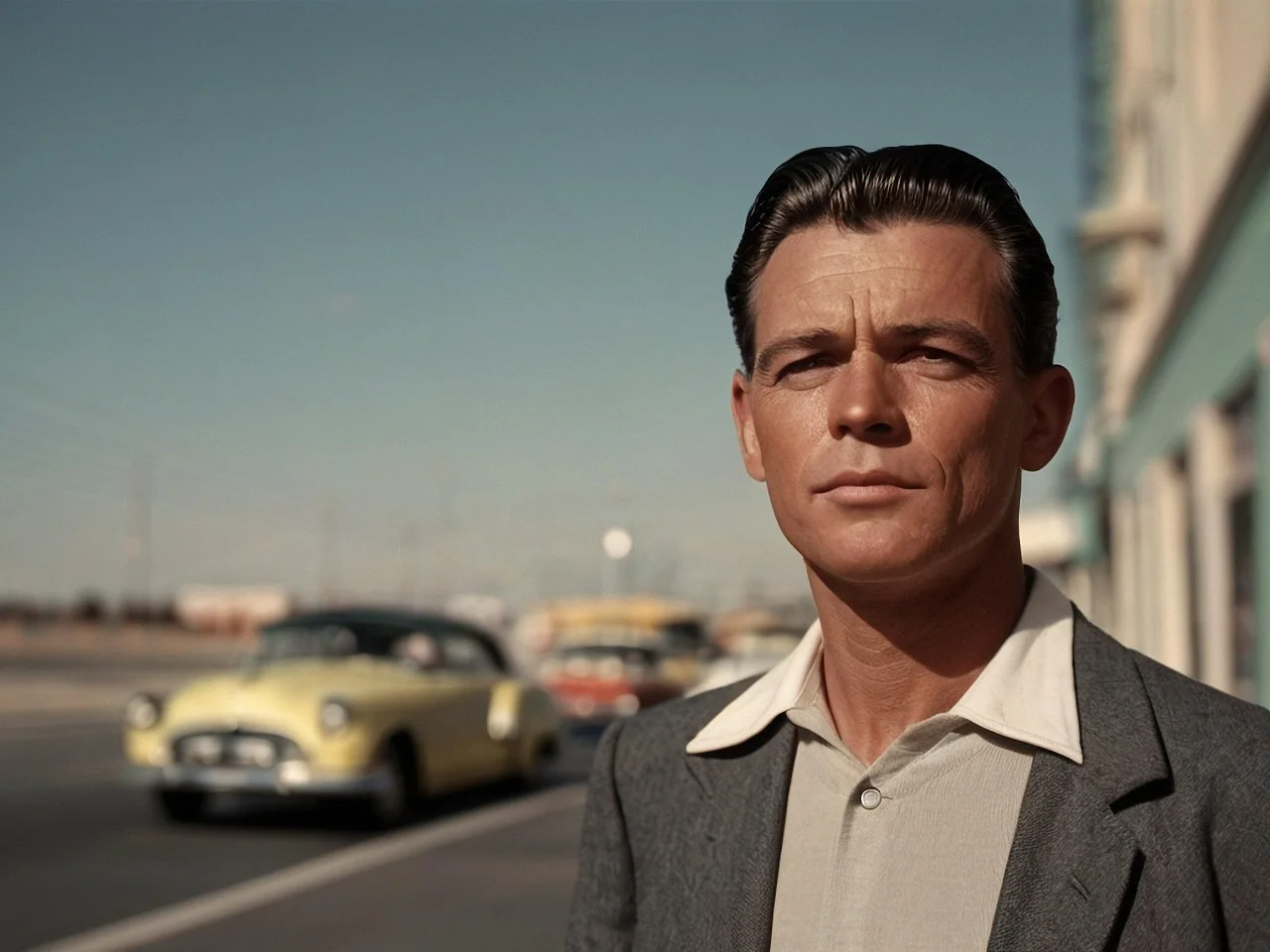 The source photo, 1280 x 960.
Kling 3.0 Standard
Got all three parts of the prompt. Easy smile, head turns a few degrees, and a red car rolls in from the left that was not in the photo. Face stays the same man throughout.
Veo 3.1 Fast
Cropped the 4:3 photo to 16:9 and lost the left edge. Sharpened and warmed the face. Cars pass with headlights on. Smile is wider than "gentle".
Pika 2.2
Took "head turn" literally and rotated him to a full profile, which flattened the hair into a slab. Cars behind him changed shape between frames.
Hailuo 2.3 Standard
Closest to the original. A small smile, a slight tilt, background exactly as shot. Cars barely move, so the third part of the prompt went missing.
Luma Ray 2
The most motion of the five. He glances down, looks up, and ends on a wide grin, while a car sweeps past close in the foreground. Nothing wrong with it, and nothing "gentle" either. Ray 3.2 sat in a queue for two hours, so this is the older model.
Runway: no API access
Runway Gen-4.5
Not run. Runway sells through its own app and subscription only.
What Each Tool Does Well
Kling AI
Kling 3.0 is the model most of the others get measured against. It handles people well: a face holds its identity across the clip, hands stay hands, and a slow head turn looks like a head turning rather than a mask sliding. You pick 720p or 1080p, and the top tier adds native audio. Clips run up to ten seconds.
The pricing needs reading twice. Plans start around $7 to $10 a month and bill in credits, six to twelve per second depending on resolution and audio. Those credits expire at the end of the billing month with no rollover. The free tier tops up daily and covers one to three short generations, which is enough to learn the prompt box and not much more.
Best for: portraits, group photos, anything where a person has to stay recognisable.
Runway
Runway's Gen-4.5 is the tool people reach for when the clip is going into an edit. Around the model sits a camera-control panel, motion brushes for telling one region to move and another to hold still, and a workflow editor for chaining steps. The Standard plan dropped to $12 a month on annual billing in May 2026, and the same dashboard now includes Veo 3.1, Kling 3.0 Pro and Seedance, so one subscription lets you try several models on the same photo.
Gen-4.5 costs 25 credits a second. A five-second clip uses 125 of the 625 credits on Standard, so budget on five clips a month at the top model, or switch to Gen-4 Turbo at 5 credits a second for drafts. The free plan gives 125 credits once, with no refresh.
Best for: cinematic camera moves, and anyone who wants several models in one place.
Google Veo 3.1
Veo produces the most photoreal footage in this group and generates sound with it: ambient noise, footsteps, a spoken line if you ask for one. Google retired Veo 3 and Veo 2 on 30 June 2026, so any review of those versions describes a model you can no longer use.
Consumers get Veo 3.1 through Google AI Pro at $19.99 a month with a monthly credit pool, or Ultra for heavy use. Developers pay per clip on the API, around fifty cents for an eight-second 1080p clip and about ten cents on the Fast variant at 720p. The prompt box lives inside Gemini, which feels odd the first time and normal by the third.
Best for: realistic product and lifestyle clips where built-in audio saves an editing step.
Luma Dream Machine
Ray 3.2 is quick and the interface is the cleanest of the six. Upload, type, wait under a minute. Every generation is capped at five seconds; to go longer you extend from the last frame and the tool stitches the pieces. 1080p is paid only, and the free plan renders at 480p with a watermark.
The entry price is the highest here at $30 a month for Plus, then $90 and $300 for the tiers that mostly add capacity in Luma's agent tools. If you want a small number of clean clips with no learning curve and cost is not the deciding factor, this is the easy choice.
Best for: fast, clean clips and a low-friction interface.
Pika
Pika 2.5 is the friendliest starting point if you have never written a motion prompt. The branded effects (inflate, melt, squish, explode) are one-click and built for social feeds. Plain image-to-video works too, with clips up to ten seconds.
Pricing is by credits and resolution: a five-second clip costs 12 credits at 480p, 20 at 720p and 40 at 1080p. Standard is $8 a month on annual billing with 700 credits, Pro is $28 with 2,300 credits and removes the watermark for commercial use. Two things to know before you buy. The free plan is 480p only, and a failed generation still costs credits.
Best for: playful effects and social clips, less so for realism.
Hailuo (MiniMax)
Hailuo 2.3 is strong on physics. Liquids pour, cloth folds, hair moves with the head. The newer H3 model goes to 2K and runs five to fifteen seconds from a first frame, with an optional last frame to steer where the motion ends. Plans start near $9.99 a month, and clips cost 15 to 80 credits depending on model and resolution, with the cinematic 1080p renders at the top of that range.
Best for: product shots with liquid or fabric, and anything where motion has to obey gravity.
Which Tool for Which Kind of Photo
The tools behave differently depending on what you feed them. Five common cases, with a prompt that works and what to watch for.
We also ran twelve current models on seven kinds of photo with the same prompt for each. Every clip sits side by side in which AI video model is best for each kind of image, with the price of each one.
Old scanned portraits
Prompt: gentle smile, slight head turn. The failure mode is a model that cleans up the scan: grain disappears, the fading gets corrected, and the result looks like a modern photo of a stranger. Kling keeps identity best. Veo tends to sharpen. Ask for "keep the film grain" if the tool lets you.
Pets
Prompt: a playful tail wag, ears perk up. Watch the sofa. A good result moves the dog and nothing else; a poor one ripples the whole frame. Fur is where cheaper resolutions fall apart, so go to 720p or above.
Landscapes
Prompt: slow push in, clouds drift, water ripples. Look for parallax, the near shore moving faster than the far peaks. Runway's camera controls are the strongest here. Luma is fast and rarely wrong on scenery.
Product shots
Prompt: bottle drops into still water, natural splash. Two things break: label text and the white background. Hailuo does the splash. Veo keeps the label readable. Check the last frame, where most models start to drift.
Drawings
Prompt: knight breathes heavily, cape flutters, dust blows past. The risk is the model "improving" the drawing into a photoreal render. Pika is happiest with stylised input. Add "keep the line art style" to the prompt on the others.
Why the Same Photo Comes Out Different
All six are diffusion models trained on video. They start from noise and step toward frames that match your photo and your prompt. The differences you see, a face that drifts, a cape that turns to smoke, come down to how well each model keeps its frames consistent with each other and how much of the original image it is allowed to change. A longer explanation lives in how image-to-video models work and temporal consistency.
Questions People Ask
- Which AI image to video generator is cheapest?
- For regular monthly use, Kling's entry plan at $7 to $10 works out cheapest per second of video. Pika's $8 Standard plan is close at 480p and 720p.
- Which one has a real free tier?
- Kling and Hailuo top up daily. Runway's 125 credits come once. Pika's free plan is 480p only. Luma's is 480p with a watermark.
- Which makes the longest clips?
- Hailuo H3 at fifteen seconds. Kling, Runway and Pika reach ten. Veo 3.1 makes eight. Luma is five per generation with extension.
- Which one adds sound?
- Veo 3.1 generates audio by default. Kling 3.0 adds native audio on its higher tier.
- Do I own the video?
- On paid plans, every tool here grants commercial use. Free tiers on Pika and Luma carry a watermark.
- Does the photo need a face in it?
- No. Landscapes, products and drawings all work; the guide lists a prompt that suits each.
If You Only Want One Clip
Every tool above assumes you will come back monthly. If you have one photo and want one video, a pay-as-you-go option makes more sense than a plan. Picto.Video does that: upload a photo, type the motion, get a five-second MP4, from $1 with no subscription.